Comics Downloader

Download manga chapters from the sites you already read.

Comics Downloader is a free browser extension. On 42 manga sites it puts a download button and a checkbox on every chapter, and saves what you pick as CBZ, ZIP or PDF.

Edge and Opera install it from the Chrome Web Store.

Every site is checked every 30 minutes
Welcome to Demon School! Iruma-kunChapters as listed on MangaDex

Downloads / Manga / Welcome to Demon School! Iruma-kun

The same thing, on a real site

Recorded on chikari.moe: open the panel, pick a chapter, download it. Nothing is sped up.

On chikari.moe: the extension's side panel loads the chapter list, one chapter is picked, and its download runs.
  1. Allow a site

    The extension does nothing on a site until you allow it in the Sites tab. One click, once per site.

  2. Pick your chapters

    Tick the ones you want, or press Download all. Several scanlation groups? You choose which.

  3. Read them anywhere

    One file per chapter lands in your Downloads folder, named and numbered for your reader app.

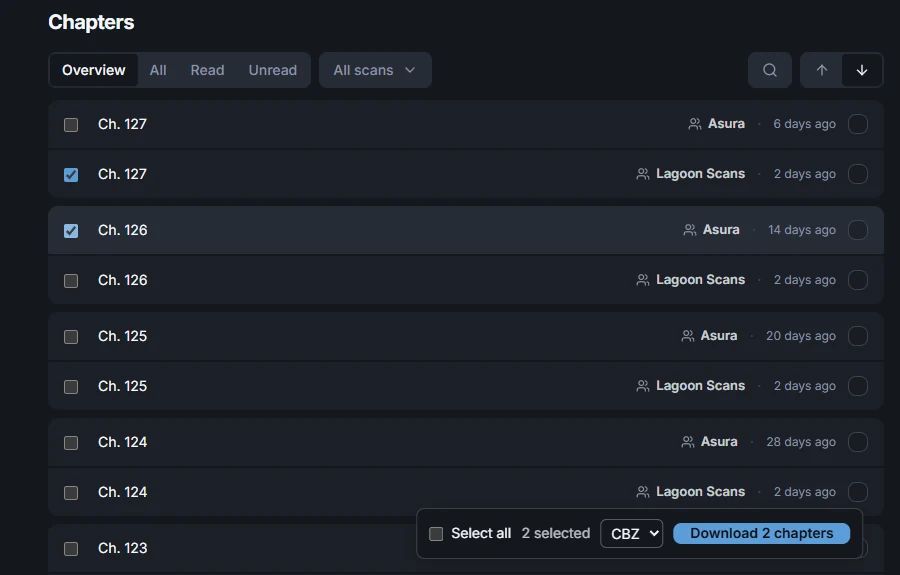
A chapter list on chikari.moe with the extension's checkboxes on each row and its bar at the bottom: 2 selected, CBZ, Download 2 chapters.
The checkboxes and the bar at the bottom are the extension’s. The rest is the site.

Buttons that look like they belong there

A series page gets Download all next to the site’s own buttons and a checkbox on every chapter. They take the site’s colours, corners and font, so nothing looks bolted on.

  • Tick a few chapters and a bar appears with the format and one Download button.
  • The buttons sit in a sealed box the site’s own code can’t read or change.
  • Chapters that cost coins on the site are left out.
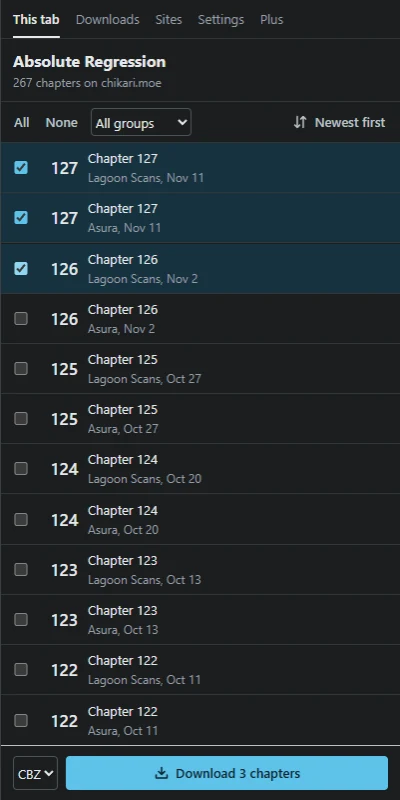
The side panel's chapter list with three chapters ticked and a Download 3 chapters button.

A side panel for everything else

Click the toolbar icon and the panel opens beside the page. It lists the chapters of whatever series is in the tab, and it works on every supported site, even the few where buttons on the page aren’t possible.

  • Click a row, then Shift-click another, to pick everything in between.
  • Pause, resume or cancel a download, and retry only the chapters that failed.
  • Each site is paced on its own, so one slow site doesn’t hold up the rest.

Files your reader app already understands

Each chapter becomes a CBZ with the series, chapter number, group and date written inside, so Kavita, Komga, Mihon and Panels sort it without help. Pages keep the quality the site serves; nothing is re-compressed.

  • CBZ, ZIP or PDF
  • Several chapters in one ZIP
  • Kavita and Komga naming
  • Your own name patterns
  • Any folder inside Downloads

It keeps to itself

Supported sites

See which ones work right now. Each is checked every 30 minutes.

58 other sites are left out on purpose, and the status page says why for each.

Plus: your reading list and your chapters, everywhere

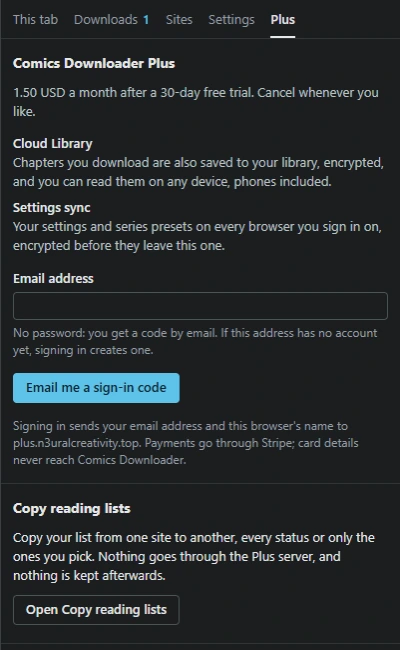
1.50 USD a month, after a 30-day free trial. The extension itself stays free.

  • Copy reading lists. New Move your list from one site to another, statuses included, across 26 sites.
  • Cloud Library. Save chapters to your library and read them in any browser, phones included. 5 GB.
  • Settings sync. Your settings and per-series presets on every browser you sign in on.
  • Encrypted in your browser. Pages, names and settings are locked before they leave it.
The extension's Plus tab: the price, Cloud Library, settings sync, the email sign-in, and Copy reading lists.