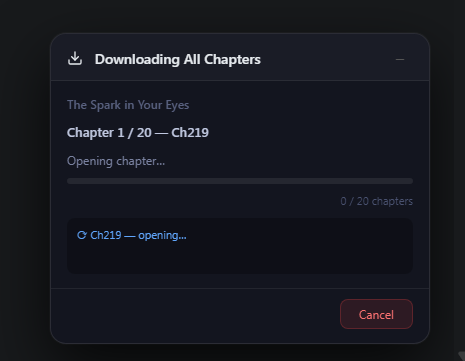
Comix Downloader adds download buttons directly to comix.to. One click grabs a whole series — zipped, foldered, and sorted. Or pick chapters one at a time. comix.ws is supported as a fallback when the primary domain is unavailable.
Add the extension, then visit any comix.to title page. Buttons appear automatically — no setup. Use comix.ws only when the primary domain is unavailable.
2
Download All, or one
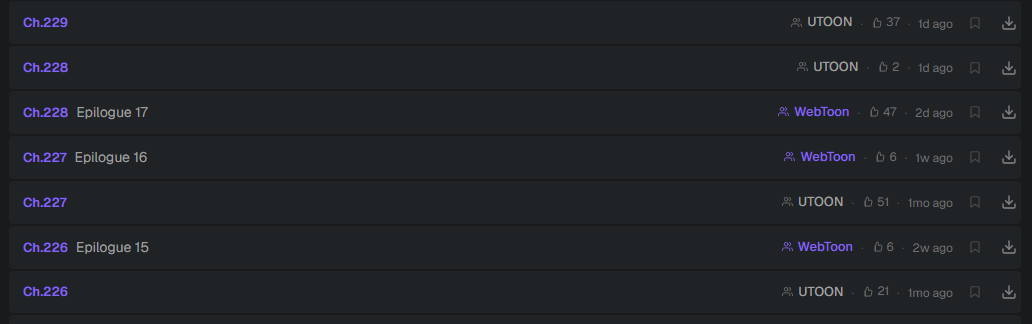
Hit Download All for the whole series, or tap the button on any single chapter row.
3
Get a tidy ZIP
Chapters are foldered, named, and padded inside one archive. Watch progress in the popup.
New in v2.4
Now it reshapes comix.to around you.
The biggest update yet turns the extension into a full reading companion. Build your own custom Home — choose the sections and the order — with a unified “What’s New” feed, a featured spotlight, and hover previews. Almost everything is optional and off by default.
Custom Home — pick & reorder your sections
Resume the exact spot, read-ahead & broken-page warnings
The extension injects a download control into each row of the chapter list, exactly where you're already looking. Grab a single update or cherry-pick a back-catalogue.
Inline, no extra clicks or new tabs
Consistent naming & numbering
Works on every title page
chapter list
Library-ready
Library-grade, and smart about it.
Save as CBZ with ComicInfo.xml and a cover — drop-in ready for Komga, Kavita, Mihon and YACReader. Pick everything from a simple panel when you hit Download All, or just press Start.
CBZ + metadata + Kavita/Komga folder layout
Skip already-downloaded — grab only what's new
Subscribe & get notified of new chapters
Optional push straight to your own media server
Download options
Comix Downloader Plus
SERVICE DISRUPTION
Plus is affected by the extension rework. New subscriptions are temporarily unavailable, and existing memberships will not renew after their current paid or trial period. Members can sign in to manage their account, billing, and saved library.